
How do I send a property listing?
There are two ways to send a listing marketing email from Cloze.
- Templates created by your marketing team
- Sending with a default template embedded in a personal email
Templates created by your marketing team
Branded listing marketing templates are available under the Market button > Send an Email. Templates are grouped under categories like Just Listed, Open House, Coming Soon, Resend, and others for quick access to specific designs.
1.) While viewing your listing in Cloze, tap on the Market button and select Send an Email.
- Navigate to your listing in the Properties section of Cloze.
- Tap on the Market button .
- Select Send and Email

2.) Select the template you wish to use.
- Search for a template by name or tag. Enter the # symbol to search by tag.
- Select one of the categories to narrow the view of templates (e.g., Just Listed).
- Change the size of the preview thumbnails.
- Select the template you wish to use.

3.) Select who you would like to send to.
- Specific People: Mail specific people. Type the names in the TO line.
- Audience: Send to an audience you have created.
- Listing Match: Market your listing to agents who have sold similar properties in the past. Cloze Enterprise only. This option can be enabled by your brokerage.
- Tag: Send to one or more tags.

4.) Send your email.
Tip: Send a test email to yourself to ensure everything looks as you expected.
-
- Send Tap on the Send button to send your email.
- Send Options: Tap on the dropdown menu to select several sending options.
- Schedule: Set your email to send at a future date and time.
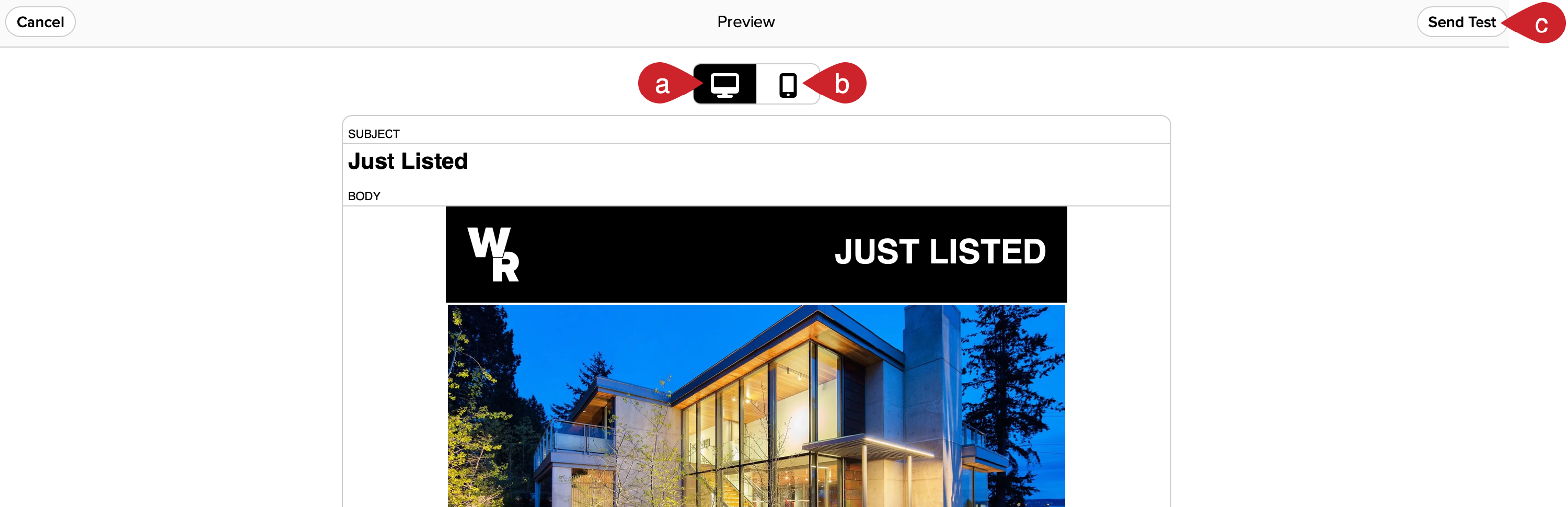
- Preview: Select the preview option to see what your email will look like when viewed by recipients. You can also send a test email to yourself.

Preview your email before sending
- Desktop: Preview your email on desktop.
- Mobile: Preview your email on mobile.
- Send Test: Send a test to review your email before you send it.
Sending with a default template embedded in a personal email
In Cloze, there are built-in default templates you can use to send property listings to specific people or to an audience. Once the property has been added to the default template, you can change templates before sending.
Use this option for a personalized, authentic outreach: This approach lets you add a personalized note as to why you are sharing the specific listing and is typically used when sending to a small group of recipients (or a single recipient).
Send from the Property
1.) Tap on the email icon and select one of the options.
- Re Property: Use this option to embed a listing in a personal email. Typically used for personalized, authentic outreach about a listing.
- To Property Matches: Use this option to send a listing to the people whose buyer profile matches this listing
- Send with a template: Send with a marketing-created, brand template (same as outlined above).

2.) In this example, we selected the Re Property option in the above menu.
- Subject: Add your email subject.
- Body: Type a personalized note.
- Select another embedable property template Select another design. Cloze includes several built-in options, and your marketing team may provide others.
- Send: Send your email.

Pro Tip: Tap on the lightbulb icon to use AI to summarize the listing and write the subject. Start with the summary and then select the subject.
- Ghostwriter: Tap on the lightbulb icon.
- Ghostwrite Summary: Add your email subject.
- Ghostwrite Subject: Type a personalized note.

The Ghostwriter will instantly create a summary and subject for you:

Send from the Properties view
1.) On the Properties tab, select your property by tapping on the checkmark next to the property name.

2.) Tap on the circle with the checkmark that appears in the lower right of the menu and then tap on "Send Email" the Properties Tab.

3.) Tap on "New Email Re".

4.) Optional: If you want to change to a different email template, tap on the tag icon in the bottom right.

5.) Add recipients to the "To" line and then tap on "Send".